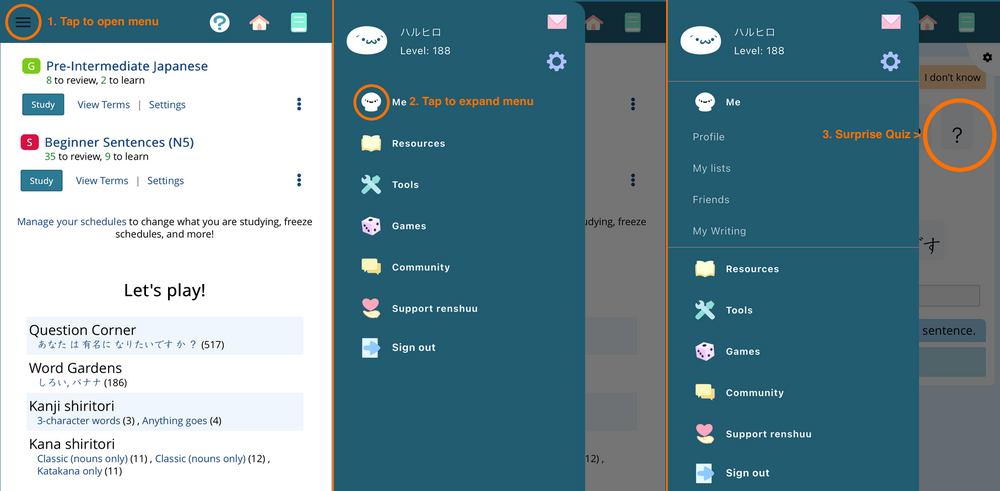
Since the recent iOS app update, tapping on things in the menu (opened via the top left hamburger button) also taps on content obscured by that menu on whatever renshuu page is open. For example, on the dashboard page, opening the menu and tapping on the right side of the "Me" header also switches dashboard tabs.
Just to make sure we're on the same page, this sequence of interactions is what I'm referring to:
Adding renshuu to the home screen via Safari doesn't have this menu-tap-through problem, so I think it's specific to the way the app store version composites the menu/top toolbar over the main content.
[Bonus update-related observation: the app store version now responds to drag-from-screen-edge navigation gestures, so dragging (far enough) from the left screen edge opens the menu and goes back a page, while dragging from the right screen edge goes forward in history. I think these used to be disabled previously, but I kind of like them, especially when interacting with the forums.]
The screenshots are in iOS light mode, with renshuu set to follow system preferences via that option in the experimental settings. The menu icon also stays black when switching iOS to dark mode.
I am getting some more info on the issue you have - it seems like it may not be related to what I thought, but it does seem like a fix is on the way in the underlying libraries that renshuu's iOS app uses.